Showing posts with label tech. Show all posts

Friday, May 11, 2018

The Wild Robot: Year-End Engagement

The end of the school year is quickly approaching, and with it comes all of the excitement of summer days. So how do you keep the kiddos engaged and interested in learning without feeling like you're dragging them to the finish line? Luckily, I was introduced to this amazing resource for The Wild Robot.

This book is amazing for 4th graders and has so many connections to animal studies! What's even better for this time of year is all of the ready-made resources inside the hyperdoc. My kids have had an amazing time reading, learning, and using tech tools. Here are a few examples:

storyboardthat thinkshareteach
Storyboard That for retelling or describing settings. 
(We used the provided template in the hyperdoc). 

thinkshareteach
Student response on the Hyperdoc after researching about robots (links also on hyperdoc).
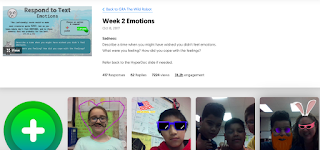
flipgrid thinkshareteach
Responding to reading with Flipgrid

scratch thinkshareteach
Creating Scratch Animations about the story 
(These weren't my students' creations. We're still working on ours). 

These are just a SAMPLING of the what you'll find on the hyperdoc. These highly engaging activities, plus the interesting story of a robot trying to adapt to life in the wild have helped capture my students' attention so they can enjoy the last few days of learning and I can feel good about the learning taking place right up until the end of the year. 


Saturday, September 22, 2012

FluxTime Studio: Easy Animations

Searching for a quick, easy, FREE tech tool you can use in your classroom? FluxTime Studio is a site that allows students to create animations, then email them as ecards. We used it this week and my kids LOVED it. You can use the links in the email to embed them into blog posts or post them on your website. Here's how I used it with my class:

Our basal story this week was about some migrating whales, so during reading on Monday, students chose a sea animal to research. They were to find three facts about their animal and download a picture to their jump drives. Then, I posted an assignment in Edmodo:
In the computer lab students wrote and edited their posts. After they finished, they watched the FluxTime video I had posted for them on Edmodo. That's one of the great features about using Edmodo. You can create a library of videos for your students to use. Here's the video I made:


Finally, students created their animations. I posted the finished animations to our classroom website, and helped a few students embed links in their blog posts. This was only their second week on KidBlog and third on Edmodo, so they needed help with embedding. 

Click HERE to see one of my student's posts with his animation linked.